CHMlib Logo Leading Translation Management System for Translation Agencies, Top Translation Management Software for Freelance Translators, Time Tracking Software, Word Count, Character Count and Line Count Software, Computer Assisted Translation Tool for Easy Word Count, Clipboard Character Count Software, User-Friendly Translation Memory Software, Terminology Management Software, Terminology Management Server, Microsoft Glossary Software, Dictionary of Acronyms, Social Network for Translators and Translation Agencies, Acronyms and Abbreviations Search Engine, Russian Translation Lab, Ukrainian Translation Lab.
You are reading help file online using chmlib.com
CrisisHelper - First Aid in Tough Times of World Economic Crisis


挑選同類型標點符號

在您完成輸入之前,若發現所輸入的有不正確的全形標點符號,可以利用手動方式挑選同類型標點符號。或者是您想要輸入的標點符號無法直接在鍵盤上找到,只要輸入一個可以在鍵盤上找到的同類型標點符號,在完成輸入之前,按照步驟從候選字視窗上挑選標點符號即可。

同類型標點符號表

• 。 ﹒ . ·
﹐ 、 , 、
﹕ : ︰
; ﹔
? ﹖
! ﹗
’ ′ ‵ ‘
” 〃 〝 〞 “
﹙ ( ︵
﹚ ) ︶
﹛ { ︷
﹜ } ︸
『 【 〔 ︹ ︻ ﹁ ﹃ ﹝ 「
』 】 〕 ︺ ︼ ﹂ ﹄ ﹞ 」
《 ︽ ︿ ﹤ < 〈
》 ︾ ﹀ ﹥ > 〉
﹌ ∼ ﹋
$ ¢ £ ¥ ﹩
% ﹪
# ﹟
& ﹠
※ ╳ ﹡ * ×
☉ ㊣ ﹫ @ ♁
◎ ● ○
≠ ≡ ≦ ≧ ﹦ = ≒
﹢ + ±
↗ ↙ / / ÷
↘ \ \ ↖
↓ ∣ ∥ ︱ ︳ ︴ | ↑
ˍ – — ‥ … ← → ╴ ﹉ ﹊ ﹍ ﹎ ﹏ ﹣ - _  ̄ ‾
 

挑選同類型標點符號

  1. 使用方向鍵中的左右鍵或滑鼠將游標移動至該全形標點符號。(注意:有些應用程式並不支援滑鼠動作。)

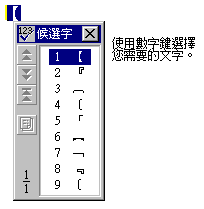
  2. 按一下空格鍵或向下鍵,出現 [候選字] 視窗。如果是輸入的最後一個全形標點符號需要修改,只要直接按向下鍵即可而不需要移動游標。

  3. 利用數字鍵或滑鼠選擇正確的標點符號。或者,也可以使用上下鍵在「候選字」視窗中選字,再按 ENTER 將標點符號送出。


You are reading help file online using chmlib.com


If you want your help file to be removed or added please send e-mail to chmlibcom@gmail.com
Partner sites: Logo Design, Simple Anti-Crisis Accounting Software, Voice Search for Web